

Most people either haven’t heard of Perplexity AI or they’ve tried it once and thought “that’s just another ChatGPT.” It isn’t. And if that’s what you think, you’re missing a major opportunity.
I’ve been using Perplexity for about a year but it took me a while to fully understand it and use it to its full potential. Most days I switch between Perplexity, ChatGPT and Claude because they do different things:
ChatGPT and (now mostly) Claude are where I think, brainstorm and draft.
Perplexity is where I investigate.
I use it every day. I also don’t entirely trust the company behind it. This post covers both sides of that coin.

So what is Perplexity AI?
Perplexity looks like a chatbot: you type a question, you get an answer. But that’s not really its primary function.
Because Perplexity is more than a chatbot. It’s a search engine with reasoning built in. You ask it a question and instead of digging into its training data to create your answer, it searches the internet in real time. It takes the results of those searches (usually several) and synthesises them into an answer for you. Every claim is cited. Every source is linked.
It’s like having a very efficient, quite smart, diligent friend who browses the Google search results (pages and pages of them) and writes you a mini essay to answer your specific question, complete with a list of sources and links to all of them.
But don’t ChatGPT, Claude and Gemini search the web too?
Yes. But there’s an important difference between Perplexity and how traditional chatbots work.
ChatGPT, Claude and Gemini are language models first. They generate answers from their training data. If they can’t answer your question, or if they think the information might have changed, they search the web and pull in results to support what they’re already saying. Search is their backup.
Perplexity works the other way around. It searches first, reads the results, and then synthesises an answer from what it found. Search isn’t the backup. Search is the starting point.
That means every answer comes with numbered citations. Click one and you see the source URL, the relevant snippet, and (usually) when it was published. You can check every claim yourself. It’s simply a superior search engine.
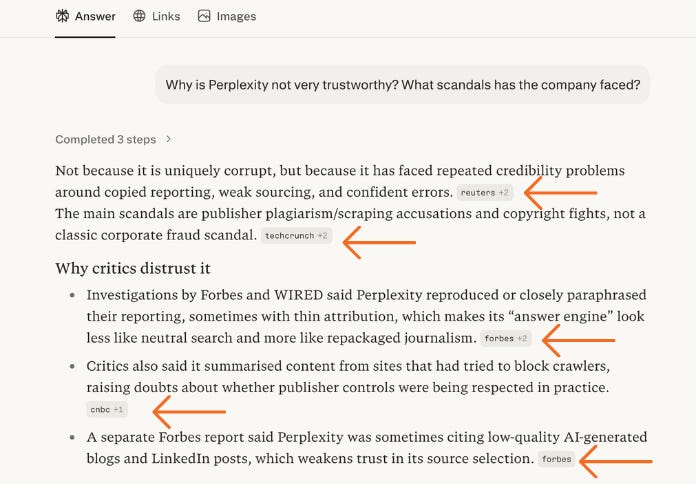
But beware…because citations don’t mean truth
When Perplexity offers citations, the information feels more trustworthy and authoritative. But, that’s a trap. Because all citations mean is “this is where I got this information.” That’s all.
The source might be wrong. It might be outdated. Perplexity might have misinterpreted it. And sometimes the citations don’t actually support the claim at all (or they don’t exist - they are empty links).
What that means for you is: treat every answer as a starting point, not a conclusion. Open the sources. Check if they actually say what Perplexity claims. Look for primary sources. And if it matters, check whether multiple independent sources agree.
This isn’t a Perplexity-specific problem. Every AI tool can get it wrong. The difference is Perplexity makes it easier to check.
So when should I use Perplexity?
Use Perplexity when you need to find things out. Use ChatGPT or Claude when you need to think things through.
More specifically, Perplexity is the right tool when:
You need current information (not training data from months ago)
You need to verify a claim or check a fact
You’re researching competitors, trends, policies or news
You’re building a case, a proposal or a recommendation
You need to show someone where the information came from
ChatGPT and Claude are the right tools when:
You’re brainstorming or drafting
You need creative or strategic thinking
You’re working with your own documents
You need complex reasoning that doesn’t depend on external sources
But can’t I just use Perplexity instead of ChatGPT, Claude or Gemini?
No. And this confuses people because Perplexity lets you choose which model runs your query. You can select Opus 4.6, GPT-5.4, Gemini 3.1 pro and others. So it feels like you’ve got all the models you need in one place.
But that’s not quite right. Perplexity is using those models to do a specific job: search, read and summarise. You’re not getting the full capabilities of those models. They’re not optimised for brainstorming, writing and creating. Those models do all of that better on their own platforms. Inside Perplexity, they’re on a leash.
If you’re finding this useful, tap the ❤️ so I know it’s landing
What should I set up first in Perplexity?
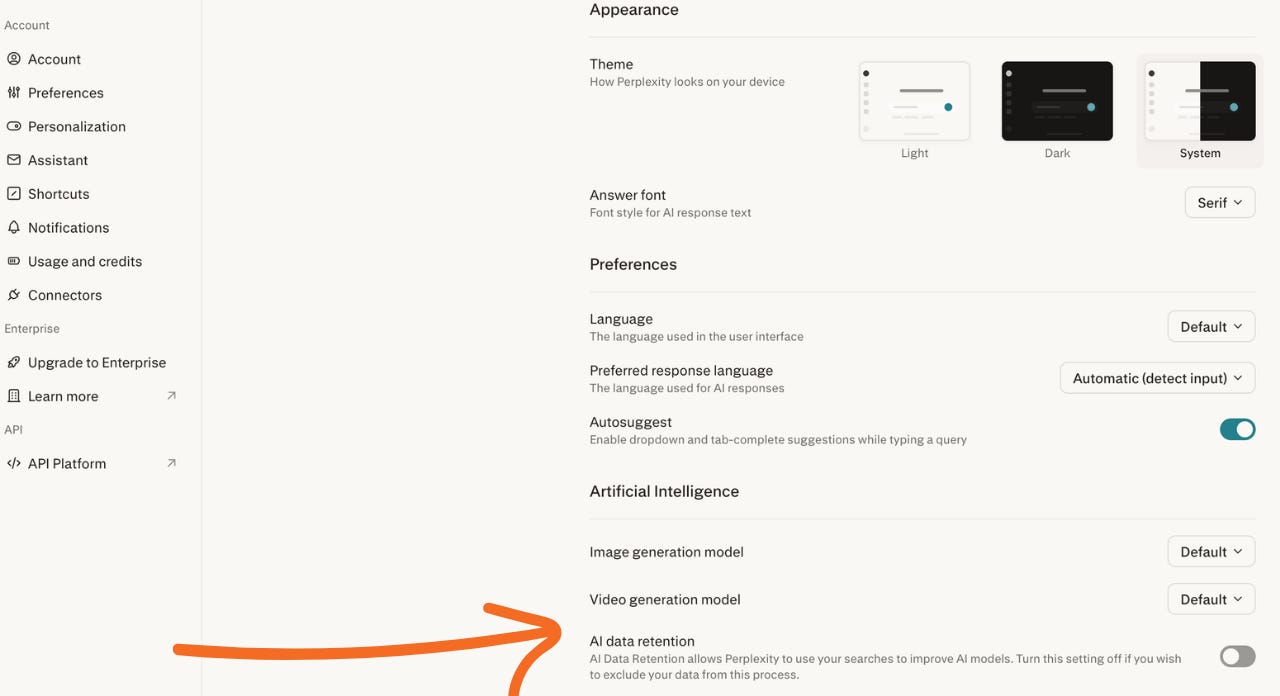
Two settings that most people never touch, and both matter.
First: turn off AI data retention. Go to Settings and switch this off. With it on, your conversations are used to train Perplexity’s models. That means you’re giving away your queries, your research, your competitive intelligence for free. Turn it off.
Second: set up your personalisation. This is a summary of who you are and how you want Perplexity to work for you. Include your professional context, your expertise level, your primary use cases and your preferences. Tell it to flag conflicting sources. Tell it to skip generic disclaimers and preamble. The better your personalisation, the less time you spend re-explaining yourself.
I also leave memory on, which means Perplexity remembers context from previous conversations. Useful, but be aware that’s more of your data sitting on their servers.
How do I get better answers from Perplexity?
Stop prompting. Start investigating.
The biggest mistake people make is asking Perplexity vague questions the way they’d ask ChatGPT. Perplexity is built for specific, investigable questions.
Vague: “What’s going on in the AI space at the moment?”
Investigable: “What are the three biggest AI news stories in March 2026 that would affect small businesses in the UK?”
See the difference? The second question gives Perplexity constraints to work with: a number, a time frame, a geography, and an audience. The tighter your question, the better the answer.
Set constraints every time. Tell it what “good enough” looks like:
Time frame: “in the last 6 months”
Geography: “in the UK” or “US-based companies”
Source type: “peer-reviewed studies” or “official reports”
Depth: “give me 3 examples” vs “comprehensive overview”
And don’t stop at the first answer. Follow up. Ask “what assumptions are you making?” or “what would change this conclusion?” or “if experts disagreed, what would each side argue?” This turns Perplexity from a fact machine into a reasoning partner.
Here are eight question patterns that work well:
Comparison: “Compare A and B on these criteria”
Timeline: “What changed between this date and that date?”
Decision brief: “What are the trade-offs of this option?”
Market scan: “Who are the top 5 players in this market and what are they doing?”
Update: “What’s new in this area since this date?”
Primary sources: “Show me primary research on this topic”
Steelman: “What’s the strongest case for and against this position?”
Confidence check: “What would change this conclusion?”
Print those out. Stick them next to your screen. They’ll change how you use it.
Or watch this video that covers them in more detail:
What is Perplexity Deep Research?
This is where Perplexity stops being a quick search tool and starts producing actual work.
Normal Perplexity answers your question by running a few searches and synthesising the results. Deep Research does something more ambitious. It runs dozens of searches autonomously, reads far more sources, cross-references them, and produces a structured report. It can ask you clarifying questions before it starts. It can reconcile conflicting sources. And it’s way better at this than ChatGPT, Claude and Gemini (which all have deep research tools).
It’s the difference between asking a colleague a quick question and asking them to go away and write you a detailed article.
Use Deep Research when you need:
A competitor analysis with sources
A market overview for a proposal
A decision brief comparing options
Background research for a presentation or pitch
Anything where someone else will read the output and expect it to be credible
Deep Research is available on Pro and Max plans. If you’re only on the free tier, this alone might be worth upgrading for.
Is Perplexity Computer like Claude Cowork?
Kind of. Computer is Perplexity’s AI agent. It doesn’t just search and summarise. It does work.
You give it a goal (build me a competitor brief, create a presentation, analyse this dataset) and it breaks the task into steps, delegates to specialised sub-agents, and delivers a finished output, either within Perplexity or one of the tools it is connected to. It can orchestrate across up to 20 models in parallel, choosing the right one for each part of the job.
It’s only available on the Max plan at $200 a month (plus VAT), and complex tasks burn through credits on top of that. Ask Perplexity how many credits a task will use before you run it.
In March 2026, Perplexity also launched Personal Computer. This runs on a dedicated Mac mini that stays on 24/7, with persistent access to your local files, apps and sessions. It connects to Perplexity’s cloud servers and works in the background while you do something else. Or while you sleep.
If that sounds similar to Claude Cowork, it is. But there’s an important difference in scope. Cowork works in specific folders you point it at. You control what it can see. Personal Computer wants always-on access to your entire machine. Given what I’m about to tell you about Perplexity’s track record, that’s a significant amount of trust to hand over.
Are you saying you don’t trust Perplexity AI?
I use Perplexity every day. I recommend it. But I don’t fully trust the company behind it.
Here’s why:
Perplexity has been accused of scraping content from websites that explicitly blocked them. In 2025, Cloudflare published independent research finding that Perplexity was using undisclosed crawlers disguised as regular Chrome browsers to bypass website blocks, across millions of requests per day. Perplexity dismissed it as a “sales pitch.”
Since then, The New York Times, the Chicago Tribune, Reddit and several Japanese newspaper companies have all filed lawsuits alleging Perplexity scraped and reproduced their content without permission. Amazon sued over Comet (Perplexity’s browser) accessing its website without authorisation and won a court order to block it. Reddit alleged that after it sent Perplexity a cease-and-desist, Perplexity’s use of Reddit content increased forty-fold.
These are allegations in active lawsuits, not proven facts (except where courts have ruled). But the pattern makes me uncomfortable. And if you’ve been in my orbit for a while you will know that most AI companies have yet to earn my trust.
Then there’s Comet itself. Perplexity has been aggressively pushing its AI browser, which is now free on Mac, Windows, Android and iPhone. Security researchers have found serious vulnerabilities: one team tricked Comet into falling for a phishing scam in under four minutes. Perplexity says it patched those specific issues. But these are exactly the risks I warned about in my video on prompt injection attacks.
And on a personal note: when I was using the Perplexity web app, I found that hovering over the Comet button would trigger an automatic download of the browser. No confirmation, no “are you sure.” It reminded me of those ads on news sites that are designed to make you accidentally click. I don’t know if they’ve stopped doing this, but it left a bad taste.
Perplexity is also quietly embedding browser control and assistant features directly into its main web product. And today launched a health product which is another source of concern for me. So even if you never download Comet, the line between “search tool” and “AI agent with access to your browsing” is being blurred.
Is Perplexity AI still worth using?
None of this means you shouldn’t use Perplexity. The search product is excellent. But go in with your eyes open. Turn off data retention. Be careful what you connect. And don’t give this company more access to your digital life than you need to.
Perplexity is the best research tool in the AI space right now. Nothing else gives you real-time search, cited sources, and structured output in one place. I use it every day and it has genuinely changed how I work.
But I am not an AI enthusiast. Spend three minutes on YouTube and you’ll find a thousand of those. I’m not an AI denier either. I think AI can add enormous value to how we work and lead. But it comes with real risks, and your job is to understand them well enough to navigate them.
Perplexity the product is excellent. Perplexity the company has questions to answer. Use the product. Watch the company. And don’t hand over more access than you need to.
Here’s where to start:
Go to perplexity.ai and create an account.
Go to Settings. Turn off AI data retention.
Set up your personalisation.
Ask one specific, investigable question using the query patterns above.
Click the citations. See what’s actually there.
Five minutes. And you’ll already be using Perplexity better than most people who’ve had it for months.
If this helped you, consider hitting the ❤️ to let me know it was worth your time.
I ran a live workshop called Become a Perplexity Super User. Sixty minutes of me using Perplexity on real work, including the parts where it fell over. The full recording is below.
Watch the recording of Become a Perplexity Super User
Available to paid subscribers only.
